What to Expect from the V13 Eyepiece Camera
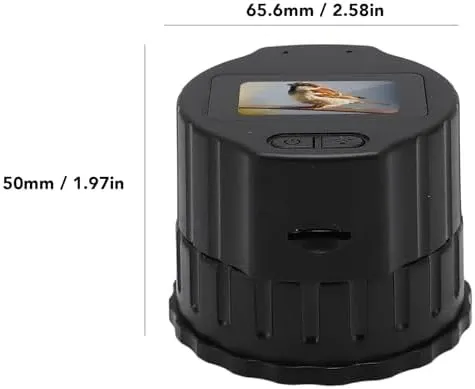
The V13 is a black electronic eyepiece for a telescope you already own. Seat it in a 28–50 mm drawtube, focus with the telescope, and watch on the 1.5-inch screen. Open Viidure if you want the same view on a phone. This page is a straight look at what is on the camera, what you add yourself, and how an evening with it usually goes.
You keep the telescope. The V13 takes the place of a normal eyepiece. The focuser on the telescope still sets the focus. A MicroSD card is separate if you want clips kept on the camera.
What sits on the camera
The body is black, with the screen on the camera rather than on a phone you have to hold to the eyepiece. That is the point of this model: you can look with both eyes open, then pass the same view to a phone when someone else wants to see it.
The 1.5-inch screen
The screen is a 1.5-inch TFT, 320 × 240, described as full-view IPS. It is small, and it is on the eyepiece itself. For a quick look at the Moon, or to check that the telescope is on the right patch of sky, you do not have to join Wi-Fi first. The screen is the live view.
If you wear glasses, this is often easier than crowding a glass eyepiece. You stand a little back, you look at the screen, and you use the telescope’s focuser until the picture settles.
Sensor and video
The sensor is a 2-megapixel CMOS. Video is 1920 × 1080, H.264, up to 30 fps. That is the recording you get on this camera. Stills and clips can go onto a MicroSD / TF card of up to 256 GB when you fit one.
For garden use in the UK, 1080p on a 2-megapixel sensor is enough to show lunar detail and a bright planet disc on the built-in screen and on Viidure. The camera does not replace a big observatory imager. It replaces the eyepiece you would otherwise look through.
What you use beside the telescope
The V13 can show the picture on the screen alone. The wireless side is extra, for when you want the same view on a phone.
Viidure on a phone
Turn the camera on, join its Wi-Fi, and open Viidure. It can show the picture on two phones at the same time. That is useful if a second person is standing next to you, or if you want a phone on a table while you still glance at the 1.5-inch screen on the camera.
You do not need a computer. The phone is the second display. Keep the camera in the tube, keep the telescope pointed, and let Viidure follow the same live view.
A memory card is extra
The slot takes a MicroSD / TF card up to 256 GB. The card is separate. Buy one if you want recordings kept on the camera. Without a card, you can still watch on the screen and on Viidure.
Power and a typical evening
The built-in battery is 800 mAh, rated for about 150 minutes of continuous use. Charge it from the Type-C port on the body before you go out. A UK garden session that runs from first dark to a tea break often fits that window. If you plan a longer night, charge again from a power bank or bring the camera in.
A practical order of work: charge from Type-C, seat the camera in a 28–50 mm tube, focus with the telescope, watch on the 1.5-inch screen, then join the camera Wi-Fi and open Viidure when you want the phone in the loop. Fit the card when you want the recording to stay on the camera.
Who this page is for
If you already have a telescope with a 28–50 mm eyepiece tube, the V13 is the electronic eyepiece that sits in that range. The product page also names single-tube, dual-head and astronomical telescopes in that fit. If your tube is outside 28–50 mm, pick another camera.
A packing list is not published for this V13, so this page does not invent a cable, a pouch, or a card in the box. What we can say is on the body: the screen, the Type-C port, the 800 mAh battery, the MicroSD slot, and the 28–50 mm seat. Buy a card if you want recordings stored on the camera. Charge the body before the first night.
It suits a first electronic eyepiece for the Moon, a bright planet, or a bird on a daytime scope in the same tube range. It also suits a household that wants two phones on Viidure without passing a glass eyepiece around.
For how the tube fit works in more detail, see How the V13 Eyepiece Camera Fits a 28–50 mm Tube. For the screen and the app together, see Watching on the 1.5-inch Screen and on Viidure.
What a first hour usually looks like
Charge the V13 from Type-C in the kitchen while you find gloves and a red torch. Outside, take out the glass eyepiece, seat the camera in the 28–50 mm tube, and power on. Point at the Moon or a bright chimney. Turn the telescope focuser until the 1.5-inch screen looks sharp. Only then join the camera Wi-Fi and open Viidure if someone else wants the view.
If the screen is black, check power and the seat. If the screen is live but soft, stay on the focuser. If Viidure is live but the screen was already sharp, you are done with setup. Fit the MicroSD card on a later night if you decide you want clips on the camera.
About 150 minutes of continuous use is the battery rating. An hour on the screen plus a stretch on two phones will eat into that. Bring the camera in to charge from Type-C if you want a second half to the night.
Questions people ask before they order
Which telescopes does it fit?
Eyepiece tubes from 28 mm to 50 mm. Focus with the telescope’s own focuser.
How do I watch on a phone?
Turn the camera on, join its Wi-Fi, and open Viidure. It can show the picture on two phones at the same time.
What memory card does it take?
A MicroSD / TF card up to 256 GB. The card is separate.
How long does the battery last?
The built-in 800 mAh battery is rated for about 150 minutes of continuous use. Charge it from the Type-C port on the body.
What are the V13 facts these guides rely on?
The V13 is a 2-megapixel CMOS eyepiece camera. Video is 1920 × 1080, H.264, up to 30 fps. The screen is a 1.5-inch TFT, 320 × 240, full-view IPS. It fits a 28–50 mm tube, runs on a built-in 800 mAh battery rated for about 150 minutes, and charges from a Type-C port.
| Question | V13 answer |
|---|---|
| Which tube does it fit? | Eyepiece tubes from 28 mm to 50 mm. Focus with the telescope. |
| Where is the screen? | 1.5-inch TFT, 320 × 240, full-view IPS, on the camera. |
| How do you watch on a phone? | Join the camera Wi-Fi and open Viidure, on up to two phones. |
| What video does it record? | 1920 × 1080, H.264, up to 30 fps, from a 2-megapixel CMOS sensor. |
| How long does the battery last? | Built-in 800 mAh, about 150 minutes. Charge from the Type-C port. |
The recording format is H.264, the codec in ITU-T Recommendation H.264. The body charges from a USB Type-C port. UK returns sit alongside the Consumer Rights Act 2015.